
Initial Experiences with CrowdStrike Agents in AgentWorks
What worked, what didn't, and my advise for building agents at scale

Spent time over the past few weeks working with agents in CrowdStrike and trying to get an AgentWorks agent working inside a Fusion SOAR workflow. Writing this up because I couldn’t find much on AgentWorks, as it’s a fairly new offering from CrowdStrike.

The goal: See the agent’s capabilities of automatic first-pass triage on the endpoint detections that get past our filters. The agent triages the detection, checks what’s happened before on that machine and user, and returns a verdict. The workflow then adds that verdict to the ticket and either closes it or escalates. This was tested at a parent CID across numerous child CID tenants under it.
Short version:
After a few days of what looked like a broken platform, it turned out there’s a specific and reproducible caveat with how the platform handles agent updates after schema changes, and knowing about it up front would have saved me a good amount of that time.
What I discovered only a few days in:
Skipping straight to it because it explains almost everything else in this article: once you publish a schema change to an agent, every existing workflow that references that agent becomes permanently frozen at the last non-schema-change version. No future updates propagate to those workflows, regardless of what you change (instructions, tools, knowledge base (KB), or reverting the schema itself). This includes both changes to existing schema, or going from one output format to another
Examples of things that will freeze agent state in workflows:
Adding or removing a feild in an output JSON schema
Going from Unstructured (Plain text) output to a JSON Schema output
Non-schema changes propagate fine. You can update instructions, add or remove tools, edit the KB, publish, and existing workflows will pick up the update. But the moment you change the input or output schema and publish, that’s the last update those workflows ever see from that agent. Every subsequent publish, including reverting the schema back to what it was, does not reach those workflows.
The AgentWorks UI still lists those workflows as referencing the current agent. The workflow’s own view shows the agent action normally. There is no version indicator, no “agent updated, refresh required” prompt, no way in the UI to tell that the workflow has become frozen.
Proof, with two trace IDs related to the same agent and EPP detection, but with different Agent versions:


Note: The error in the trace for the top image is related to hitting a credit quota for the run, nothing else.
Same agent, same Shift Browser detection, same EPP trigger. Ran it in an existing workflow that had prior schema changes: failed twice at 1 credit and 3 credits after 2 minutes of runaway tool calls. Created a fresh workflow referencing the same agent so my new instruction changes could update properly, ran the same detection: completed in 34 seconds for 0.25 credits with correct structured output. Same agent name in AgentWorks, same details page, ten-minute gap between runs, but the existing workflow was pinned to an older version of the agent (with different instructions and tool list than the current one) from July 22, and there was no indicator anywhere else in the UI that this was the case.
Which explains a huge amount of what I’d spent the previous few days fighting:
Runs that looked like structured output “couldn’t terminate”: the workflow was running the old, sprawling instructions with the old tool list, not the tightened version I thought I was testing
“Schema is too complex” errors on schemas I’d already trimmed: this one is an issue I faced initially when trying to create an output schema. The validator does not document its complexity threshold, however I was able to trim things down and get the schema to an accepted state.
Cost variance on identical detections: some tests hit updated agents (in workflows that did not have a previous schema change) and some hit stale ones.
Details page showing JSON Schema output while the trace said unstructured: this is also something I found. The agent details page and the trace can disagree on output format sometimes, and the trace is truth. Best way to confirm what a workflow is actually running is to export the trace as JSON and read the aw_agent.definition.output_format field directly
Validation:
Just to validate this finding, I confirmed things with a clean isolated test on a brand new agent:
Created a new agent, published. Created a workflow referencing it.
Added a tool to the agent, published. Ran the workflow. Trace showed the current agent version, tool addition reflected. Updates propagate normally.
Changed the output schema (JSON Schema to Unstructured), published. Ran the workflow. Trace still showed the pre-schema-change version, and the output format field in the trace still showed the old setting.
Changed the schema back (Unstructured to JSON Schema), published. Ran the workflow. Trace still stuck.
Added a distinctive marker phrase ("TEST-INSTRUCTION-CHANGE") to the agent’s instructions requiring it appear in the output summary. Published this and ran the original stuck workflow and a freshly created new workflow in AgentWorks against the same detection. The fresh workflow’s output contained the marker. The stuck workflow’s output did not.
The fix:
Finalize your input and output schemas before wiring the agent into any workflow you plan to keep. Once schemas are stable, you can iterate freely on instructions, tools, and knowledge bases, and existing workflows will pick up those updates normally. If you have to change a schema after a workflow already exists, create a new workflow from AgentWorks after publishing the change. The existing workflow will never see the new schema or any subsequent update, so continuing to edit it is wasted effort. It is possible this is documented platform behavior I have not come across rather than a bug, but either way it is not surfaced anywhere obvious in the UI, and knowing about it up front would have saved me debugging time.
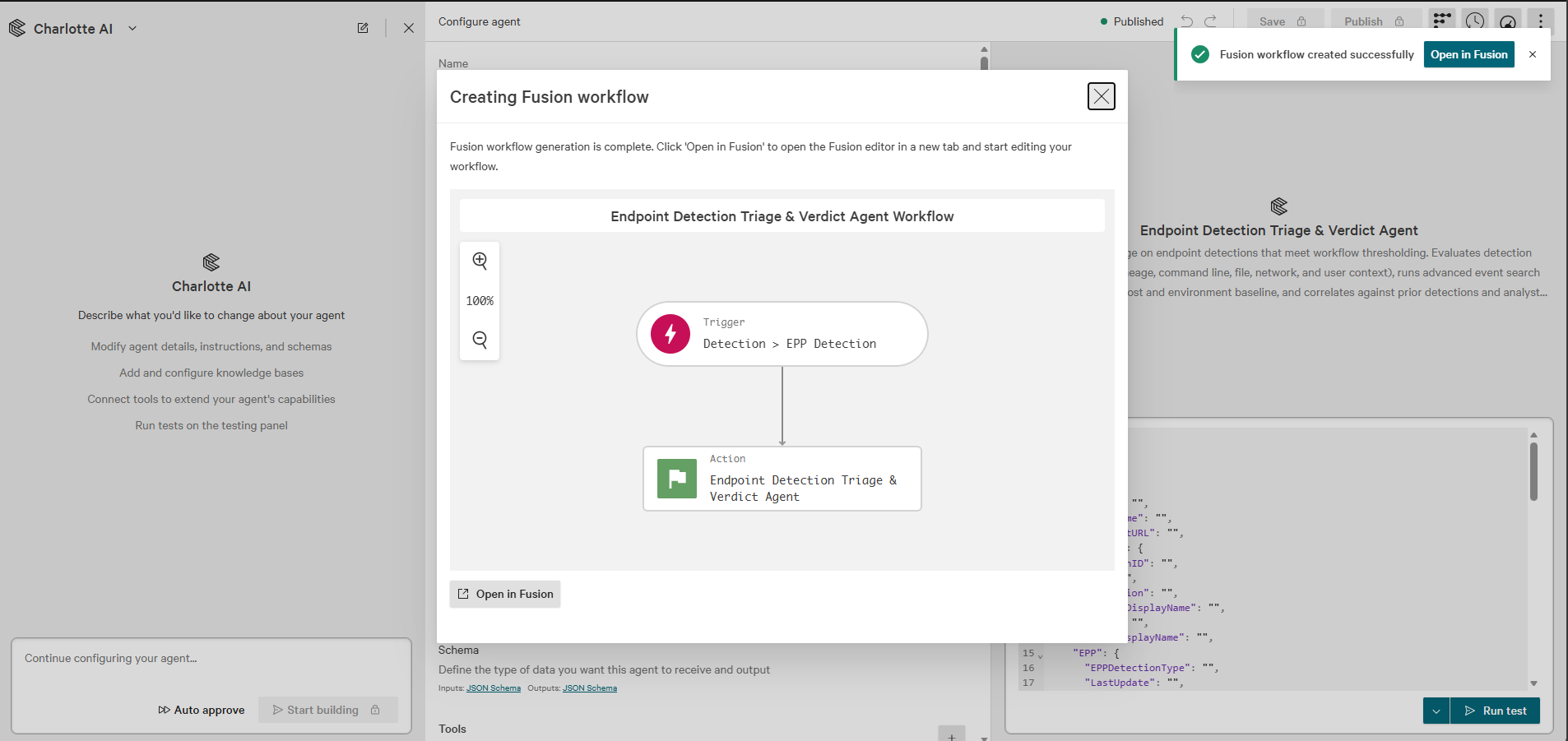
Photo below shows creating a fresh workflow directly from Agent Works.
The architecture that actually works:
Once you’re past the stale-agent issue, the design the platform was pitched around actually works, and it’s clean:
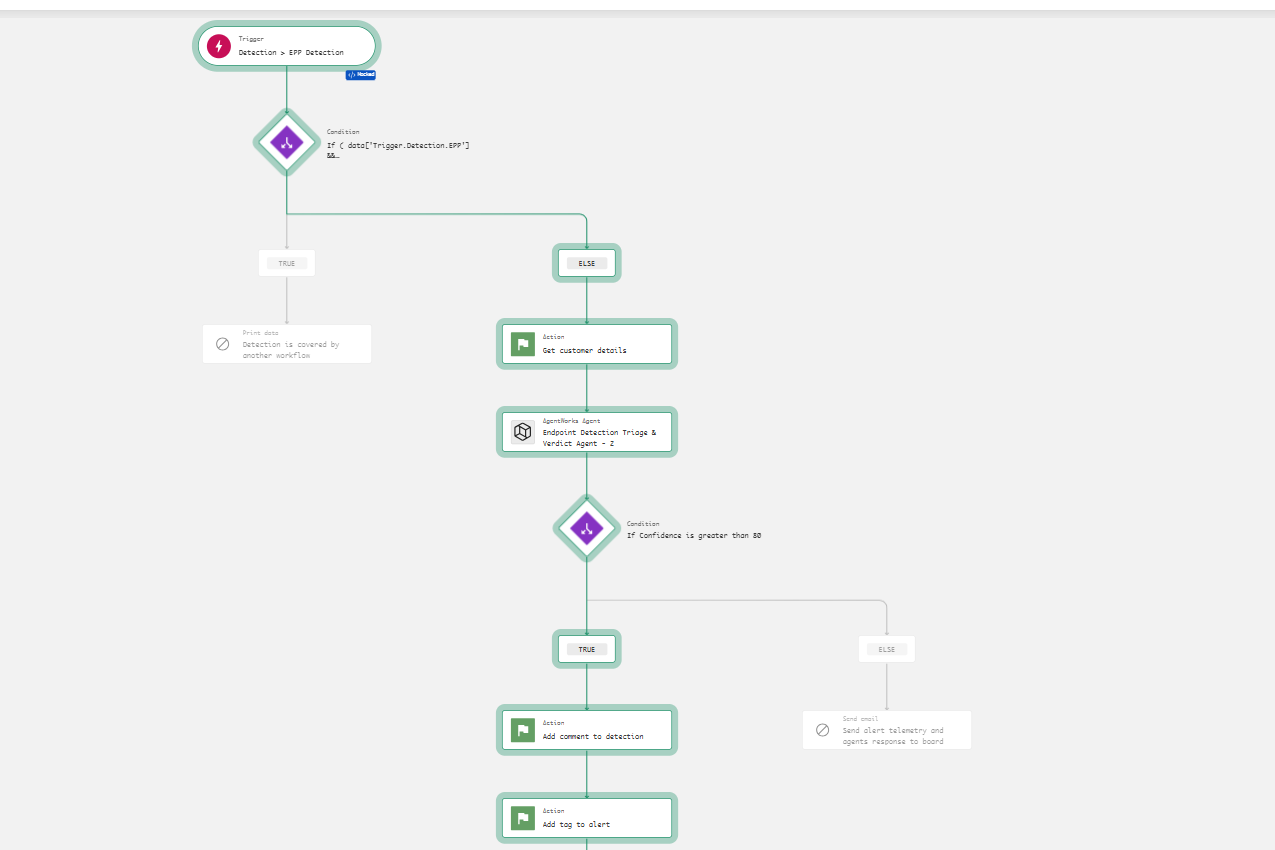
Trigger (filtered) → Agent (JSON Schema output) → Condition on data.verdict → ActionsOne workflow. Structured output. Direct data-pill access to individual fields that you create in the agent’s output schema
Example:
(verdict, confidence, auto_close_eligible, recommended_disposition, summary, ticket_body).
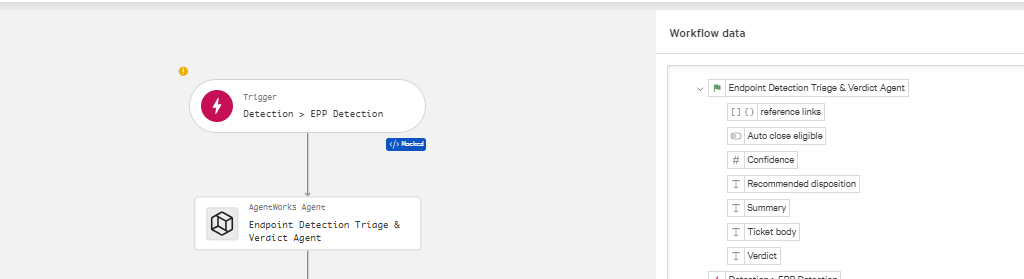
No parse step, no second workflow, no log-scraping.
Every field is individually branchable in the workflow, individually queryable in Advanced Event Search, and individually usable in CEL expressions for downstream actions. The #event_simpleName FusionWorkflowEvent carries the structured output with typed field names, which means you can build dashboards and audit queries on top of the agent’s output without parsing anything.
For example, a custom IOC detection (Shift browser on a host), I configured the agents JSON output schema so that the workflow received data pills similar to this:
data['EndpointDetectionTriageVerdictAgent.verdict']              → "True Positive"
data['EndpointDetectionTriageVerdictAgent.confidence']           → 95
data['EndpointDetectionTriageVerdictAgent.auto_close_eligible']  → false
data['EndpointDetectionTriageVerdictAgent.recommended_disposition'] → "remove persistence"
data['EndpointDetectionTriageVerdictAgent.summary']              → "Custom IOC / Custom Intelligence detection, persistence removal needed…"
data['EndpointDetectionTriageVerdictAgent.ticket_body']          → "VERDICT: browser PUP (confidence 95%)…"
Wire a condition on verdict, confidence or auto_close_eligible, branch to enrich / auto-close / escalate. That’s the design.
Naming your Agent:
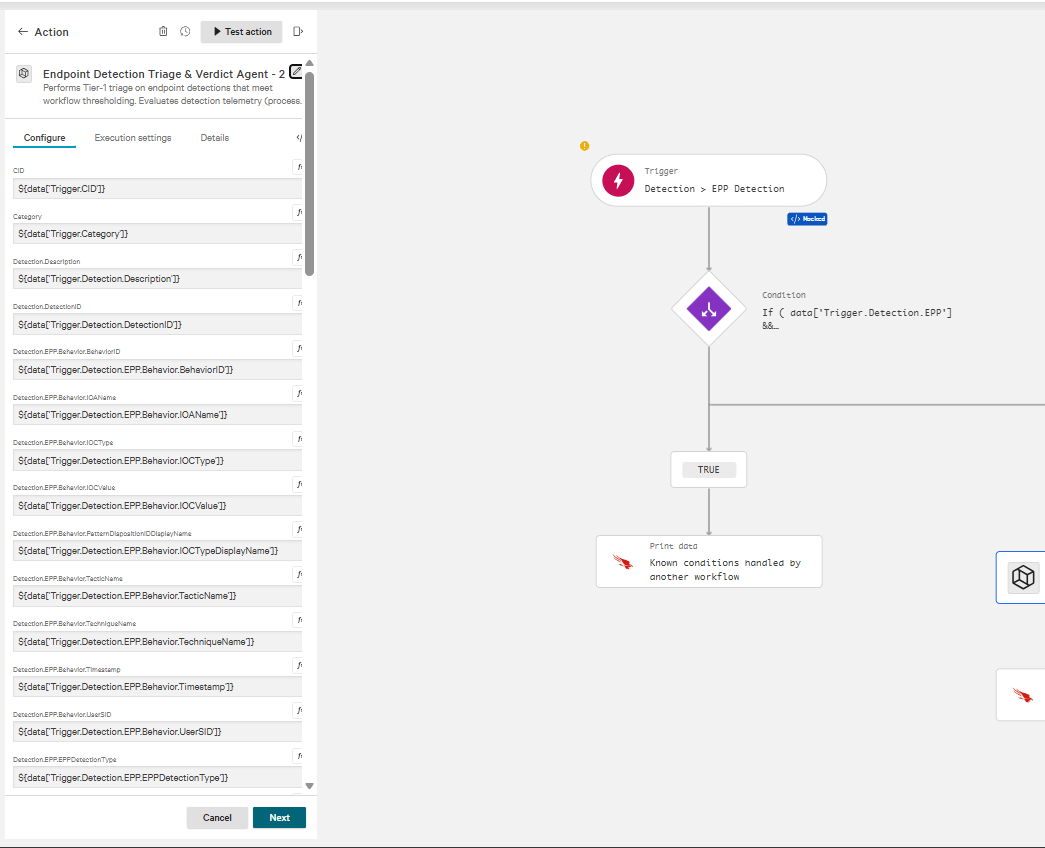
One interesting thing that is worth mentioning is that your agent’s name can determine what workflow trigger is set when creating a Fusion SOAR workflow for your agent directly in AgentWorks.
The two screenshots below depict this:
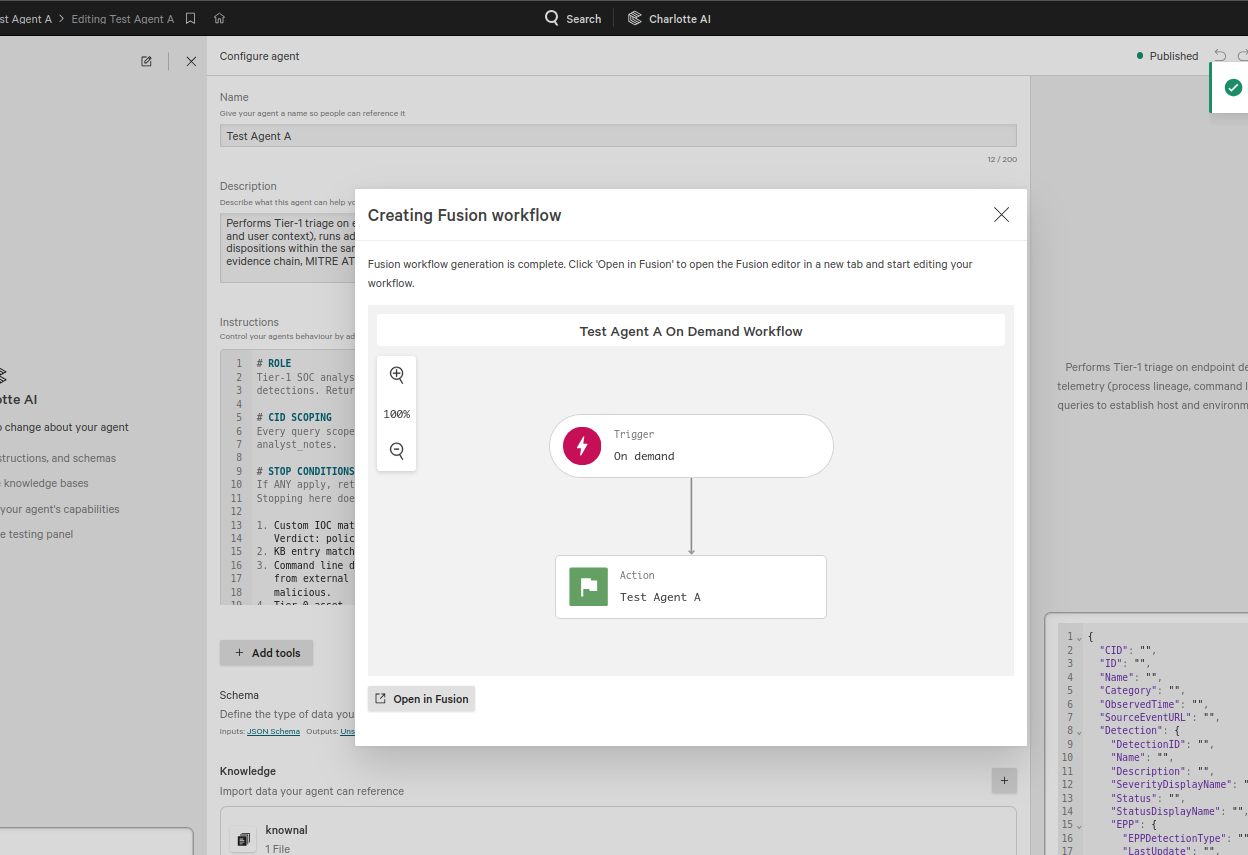
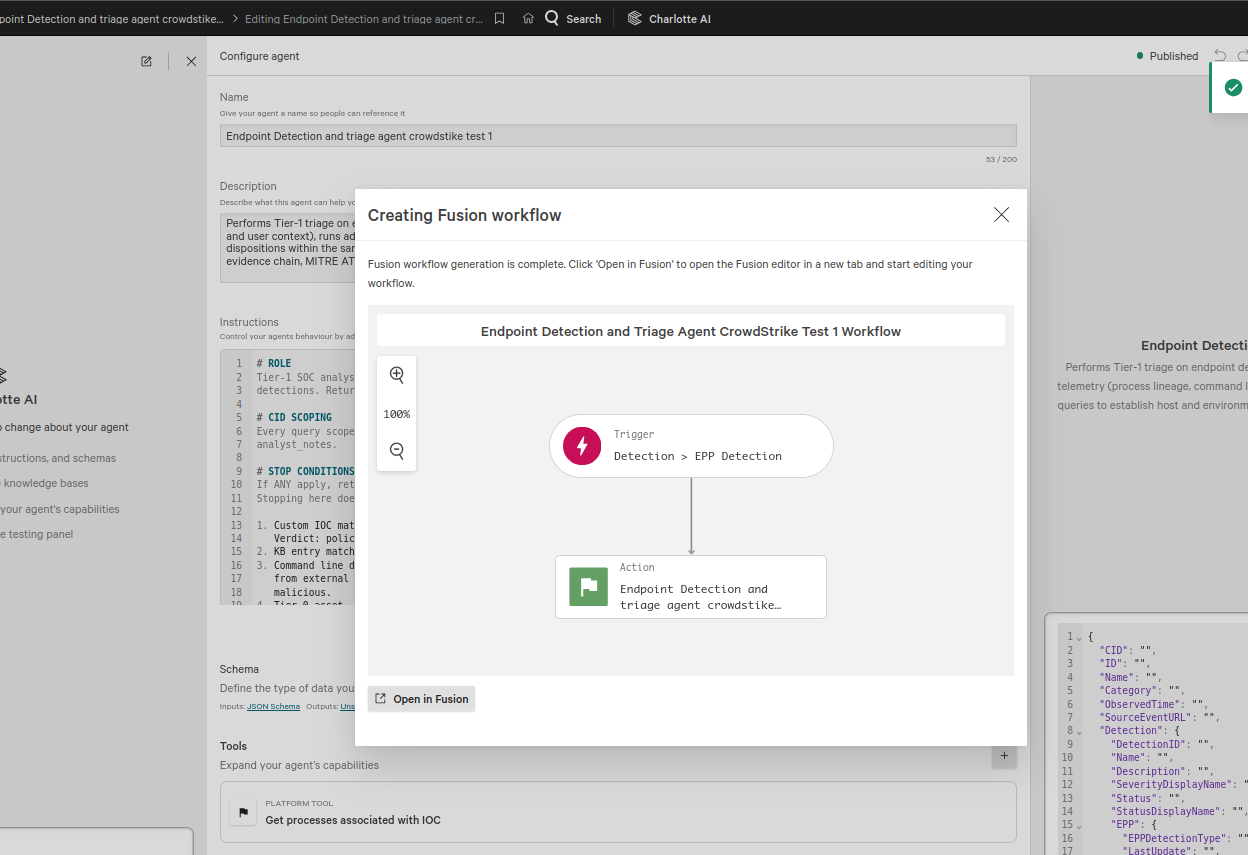
Same agent instructions, just a different name. The generic agent name (Test Agent A) got an on demand schema while the triage focused agent name (Endpoint Detection and triage agent..) got an EPP Detection trigger. It appears CrowdStrike uses machine learning to configure your workflow trigger based on the agent's name, so create an appropriate name based on the agent’s job and what trigger you want it to have.
The Python parse pattern (for fallback or advanced cases):
Structured JSON output is the right pattern when it works, but sometimes you’ll want to fall back on unstructured output and parse the response yourself. Reasons you might go this route:
You are hitting one of the platform’s structured-output validation issues with schema complexity and want to work around them rather than fight them
You want the agent to write freely and pull specific values out downstream
You are enriching or transforming the agent’s output before branching
For those cases, run the agent with unstructured output, describe the shape you want in the instructions (could be JSON), and add a Python action to extract fields from the response.
The catch: Under unstructured mode the response can be nested one or two layers deep in wrapper objects, with the actual JSON or response inside a fenced code block, buried inside the agent’s free-text response. The parser has to peel back the wrappers, find the fenced block, and only then parse the verdict object.
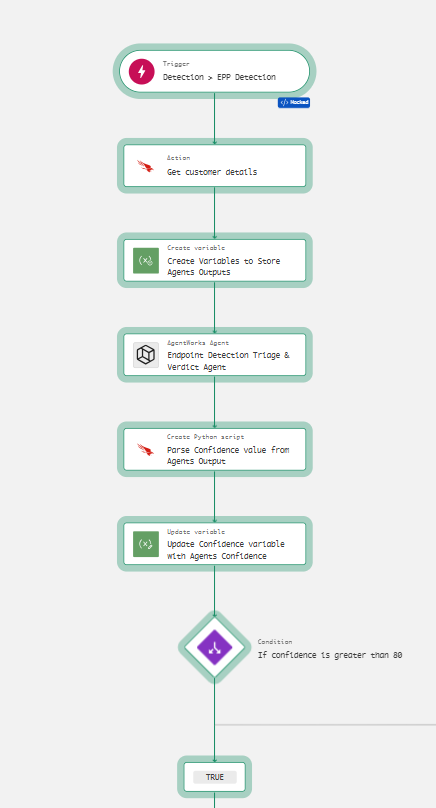
Example: You want to pull confidence score from agent’s output, store it in a custom variable and create a condition match statement against the confidence score to determine the path the workflow should take.
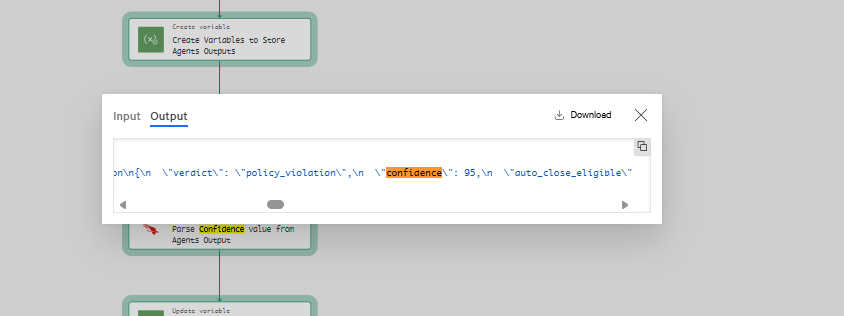
A simple workflow I created to demonstrate this is the following:
Trigger → get customer details → create empty variables → agent (unstructured) → Python parse action → update variables → branch on the variables.
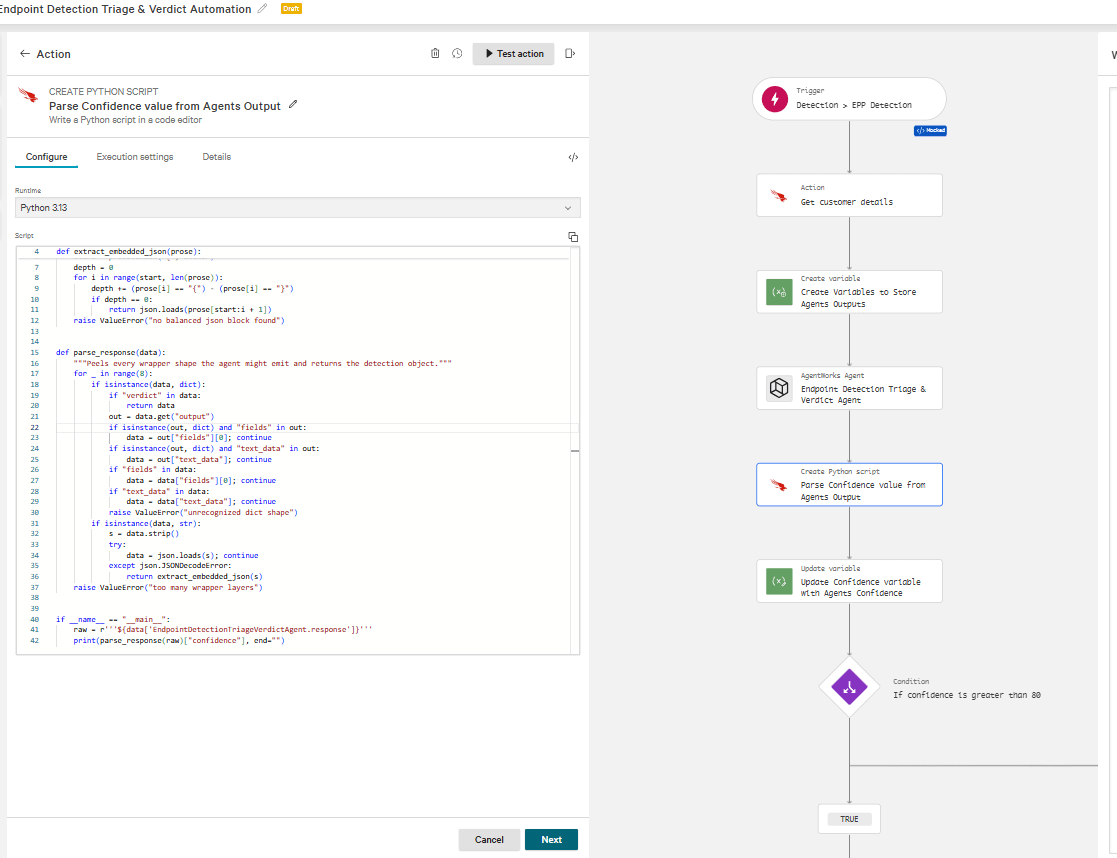
Once parsed, the extracted value populates a workflow variable you can branch on. The extracted value is stored in the Python Standard Output Data Pill:
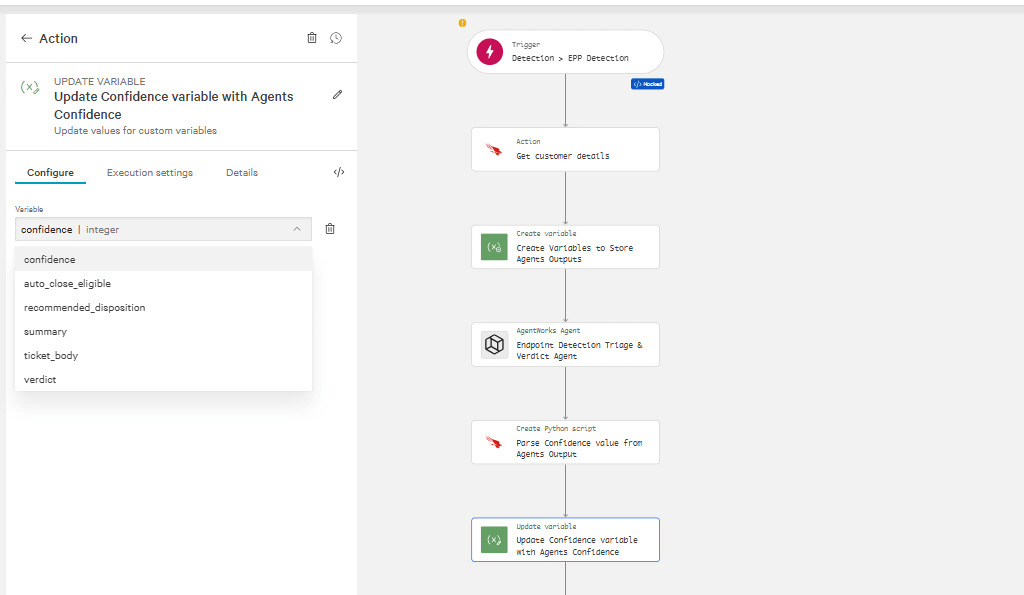
If you build this, fail safe on parse errors. An empty or unparseable response should route to escalation, never to auto-close. The direct data-pill approach is cleaner, but this is another option for edge cases if needed.
The python action is pretty new in Fusion SOAR, docs can be found here:
https://docs.crowdstrike.com/r/en-US/edd8jdz1/lca61cb1
How to monitor it:
The credit monitoring dashboard silently excludes workflow-invoked agent spend. Dashboard might say 48.92 credits used, the per-user breakdown adds to 1.87, and the missing 47 credits are agent runs invoked by workflows, attributed to no user, appearing on no chart. If you rely on the dashboard, you will not see your actual spend.
Agent Metrics and Traces are my go-to way to get a granular view of credits used per agent runs, success / failures, and more.
FusionWorkflowEvent in Advanced Event Search:
Another thing that I like is the agent’s output is directly visible in advanced event search. Here is a query to get details about your agent workflow runs.
#event_simpleName=FusionWorkflowEvent #repo=fusion
| action.use_cases[0]="AI agents" OR action.use_cases[1]="Agentworks AI agents"
| table([@timestamp, cid,definition_name, definition_id, execution_id, status, action.name, action.node_id, action.semantic_version, action.version, action.output._reference_links[0].url], limit=1000)
| sort(@timestamp, order=desc)
That reference-links field gives you direct clickable URLs into the agent trace UI for every run, the fastest way to jump from a log entry to the full reasoning.
Things that worked well:
I tested it on a detection tied to a ClickFix-style malware loader, the kind that hides and obfuscates what it’s doing behind scrambled, disguised command text. It untangled all of it, worked out that the real intent was “download a file from this address and run it,” and listed each disguise technique separately. A solid first-pass write-up in 77 seconds. It went further as well correlating dns requests from the endpoint during the timestamp of alert, and trying to paint a full picture of the alert.

The file flagged in that detection was just cmd.exe, a normal, built-in Windows program. On the thorough runs it caught that, explained the threat was in how the command was used rather than the file itself, and specifically warned against blocking the file, since that would break cmd.exe on every machine in the tenant. Nobody told it that, it worked it out.
It reads previous analysts’ notes. On a repeat detection for an unwanted browser, it found an earlier detection for the same file on the same machine, saw that a colleague had already closed it as a real (but low-priority) finding with the note “Browser PUP,” identified who had set up the block, linked the case, and weighted that human decision correctly.
It kept each CID’s data separate every time I checked. One lookup pulled back a machine I didn’t recognize; it confirmed the machine actually belonged to the tenant it was working in before using it, and wrote a note saying so. On another run it noticed an unrelated Windows Update event on the same machine and deliberately set it aside instead of chasing it.
It was honest when its tools failed. One run pointed out that a threat-intelligence lookup had errored rather than come back clean, an important difference, and one a good analyst would flag.
It surfaced things I wasn’t looking for: an influx of informational alerts tied to one CID that could be potentially suppressed, an unwanted app spreading across two different CID’s, and a scheduled task that would have kept re-triggering a detection even after the file was quarantined.
The Fusion action lets you set a hard credit cap, a real enforced ceiling, not just an instruction the model might ignore.
The other platform issues I hit:
Beyond the stale-agent, there are some platform quirks worth knowing about:
The input format and the output format have contradictory rules about what they accept. Input schemas want additionalProperties: true; output schemas reject it and demand false. There's a limit on how many optional fields you can have, and no minimum/maximum allowed on integer types, none of it documented anywhere I could find until you trip over it.
One error message came back with a {properties} placeholder in it, the validator couldn’t fill in which field had failed.
One of CrowdStrike’s own built-in tools has a setup the underlying model refuses to accept. Attach that tool and nothing runs at all. It was slow to track down because the error points at a tool by position, and the position shifts every time you remove a different tool.
The credit cap itself does seem to be a hard limit but I had an interesting situation with it. I set a 0.5-credit cap on a test run and it consumed a full credit, 100% over before the platform stopped it. The agent had fired off multiple tools in parallel before the accounting layer caught up. This was a possible round up by CrowdStrike due to the low credit usage set for the run, but still something worth noting.
Cost, and the trade-off underneath it:
Cost and quality move together, and there’s no setting that gives you both. The expensive runs correctly identified the cmd.exe file as a normal Windows program and said not to block it, stuck to the confidence limits I set, and returned a valid verdict. The cheap 0.52-credit run on the same detection recommended blocking that file, this would break every machine in the tenant and it treated 8 machines all running normal cmd.exe as evidence of an attack campaign, and ignored the confidence limit. The only difference between the two was budget. The cheap run and the correct run were never the same run.
One exception, and it’s the important one: you can get cheap and correct at the same time. One way of doing this is having a knowledge base already holds the answer instead of the agent having to go digging for it. Same unwanted-browser detection, before and after I added one rule to the knowledge base regarding our custom IOC actions plus a short entry describing that app. Before: 3.9 credits and a wishy-washy “probably fine, needs a human.” After: 2.29 credits, correct verdict, pulled in the earlier analyst’s decision, and caught the scheduled-task problem on its own. Cheaper and better, because the knowledge base did the work the agent was otherwise burning credits trying to reconstruct.
Running at parent-tenant scale
Keeping each CID’s data separate depends on the model remembering to do it on every lookup, not on the platform enforcing it. It remembered every time I looked. Still not something I’d want holding up tenant separation across hundreds of environments.
One knowledge base can't represent hundreds of different environments. Approved software, vendors, and known false alarms differ from tenant to tenant, so every entry needs a label saying which CID it’s for. But nothing stops the agent from using the wrong CID's entry. The platform doesn't restrict which entries it can see per environment, so it’s relying on the model to read the label and respect it. Nothing technically stops an entry written for one environment from being applied to another.
It wanders. My most expensive run widened its own search window and pulled in two neighbouring machines on a hunch. In a single CID that’s a thorough analyst. At parent scale it’s an agent with reach into hundreds of environments deciding on its own to look wider.
If you’re building one of these (some tips and advice)
Tip 1:
Before you write anything:
Understand the architecture you want to build at and your goals with your agents.
Building a one and done agent for all CrowdStrike alerts coming in is probably not the best choice for agent triaging accuracy and usage costs. Identify the tasks you want your agents to do:
Examples:
Response to all CrowdStrike OverWatch alerts and enrich the notes OverWatch analysts provide.
Response to all detections with an alert severity of High or above.
Response to detections related to a browser download where CrowdStrike’s sensor does not quarantine the file upon download.
This will allow you to feed a specific knowledge base to the agent geared towards its job and create task specific instructions per agent, which increases detection accuracy and decreases costs.
Tip 2:
When you are iterating on the agent, test directly in AgentWorks rather than through a workflow. Non-schema updates to the agent (instructions, tools, KB) will propagate to existing workflows, so you can iterate there if you want. But schema changes will freeze any workflow already referencing the agent, so if you know the schema is still going to change, hold off on creating the workflow until it's stable. Only wire the agent into a workflow when you're ready to validate the input/output schema mapping and data pills, and only push it into a production workflow when the agent itself is solid and thoroughly tested.
Tip 3:
Build your agents according to your budget and credit quotas.
Say you want an agent to do first-pass triage on every high-or-greater criticality alert, and you average 100 of them a month against a 200 credit monthly Charlotte AI budget. That gives you about 2 credits per run on average.
Before any complex SOAR workflows or automations gets built. Understand the key tasks you want your agent to be doing, whether that is triage, incident response, scheduled threat hunting, etc.
Feed the agent relevant telemetry or prompts tied to its task and start with a very low credit limit enforcement. Read the agent’s traces after a successful test or workflow run. Was its analysis thorough? Did it identify the threat? Were there misclassifications or any gaps?
If there were issues with the agent’s run, identify them and think, “Would any change or enrichment to the agent’s instructions, inputs, tools or knowledge base potentially improve the run while keeping the credits the same or even lower? Attempt to make changes to these 4 things before increasing the agent’s credit usage threshold per run.
Tip 4:
More is not always better
You have 14,000 characters of space to give your agent instructions and can add almost 80 tools for your agent to use. However, scope your choices down to what is actually needed for your agent to complete the task. 5,000 characters of tight, concise, targeted instructions beats 12,000 characters of vague, sprawling ones every time.
More tools means more surface area for the agent to go wandering. My worst run had 13 tools attached and used almost all of them — it correctly worked out the command was malicious early on, then kept going anyway: roughly 14 separate log searches, repeat lookups on a host it had already checked, and calls to tools that had nothing to do with the question.
I had one workflow run for almost 10 minutes and 24 tool calls, burning all 12 credits and erroring out with no verdict at all when the credit pool exhausted. Cutting the tool list down to 5 relevant tools and adding a hard stop-and-answer rule solved that, the same detection then finished in about a minute for under a credit. But the accuracy dropped with it: that cheap, fast run recommended blocking the cmd.exe hash tenant-wide, something the slower, more expensive runs correctly knew not to do. So it isn't simply "fewer tools and a budget cap solves it," cutting the agent off too early trades one failure mode (runaway cost) for another (wrong answer, delivered confidently). You need both a real ceiling on tool usage and enough investigation depth inside that ceiling to actually reach a correct verdict, and striking that balance is key.
Tip 5:
Enrich the data that you feed the agent. I created an input schema for the agent that mirrored the schema of an EPP detection. This allowed the agent to get full context of alert right off the bat. What CID was involved, what were the IOCs involved, what was the process linage. This will allow your agent to have the ability to effectively utilize its tools to hunt and triage in a targeted manner. If it has to go and find the machine details, the history, and how common something is, that’s more tool calls, more time, more credits — and it’ll chase weak results and keep digging.
Tip 6:
Set the credit cap on the Fusion action straight away. Especially if you are operating agents at a multi CID scale, do not let the agent run endlessly unless you have the budget to take that risk.
Tip 7:
Check you can actually pull previous analysts' decisions before you build logic that relies on them. They're not required for auto-close, but they're one of the strongest context sources the agent has, past dispositions get you to a correct verdict faster, with fewer tool calls, at lower credit cost. Mine worked when there was history to find and returned nothing when there wasn't any. Correct behavior, but you can't tell those apart from an empty result until you test a machine that has history.
This only pays off if your analysts stay disciplined about leaving real triage notes when they close something — true positive, false positive, and why. The agent’s best result came from finding a colleague’s note on an identical past detection and using it to confirm the verdict fast, without burning credits re-investigating something a human had already settled. Without those notes the agent still has its knowledge base, tools, and reasoning to fall back on, but it’s working every detection cold, with no record of what’s already been decided about that machine, user, or pattern before that could be related to the current case it is working on.
Knowledge base and instructions:
The knowledge base is the highest-value thing you’ll build. One added rule into the knowledge base turned a 3.9-credit shrug into a 2.29-credit correct answer on the same detection. The model already knows what an attack looks like in general. What it can't know is that a specific scheduled task running nightly on your servers is a legitimate backup job. Write down your real toolset: remote management, backup, patching, software deployment, your line-of-business apps, your service accounts.
Populate the KB with things the agent needs context on, not things you should be excluding upstream. If a detection is a clean, repeatable false positive, suppress it with an exclusion so it never fires. If it’s ambiguous, tool-specific, or requires understanding your environment (approved RMM software, known vendor patchers, service accounts that legitimately spawn shells), that’s what the KB is for. Pull 90 days of dispositions to identify the ambiguous patterns your analysts had to think about, not the clear-cut ones they closed on sight, and write those up.
Every entry needs a "this does not apply if…" section. Writing "ScreenConnect is approved" teaches the agent to wave through anything named ScreenConnect. Pin it down: where the file lives, who signed it, what launched it, which account ran it, then spell out exactly what would break the match.
How to structure it:
Don’t give the agent the ability to close or change anything. Let it return a verdict and have the workflow take the action. That’s repeatable, you can see exactly why something got closed, and you can turn automation on for one environment at a time.
Put a simple filter in front of it. If a detection matches a known pattern by name and command, close it in the workflow for free. A routine nightly job doesn’t need an AI looking at it.
Give it one tool per job. I had two search tools that overlapped, and it kept bouncing between them whenever one came back thin.
Give it fields to report what it couldn’t check and why it escalated. Those two were the most useful things in the whole setup, they tell you why it isn’t closing things and which tools are failing.
Be ruthless about what reaches the agent at all, and build agents for specific tasks. Even a well-built one can’t run on every alert unless your credit budget is huge. At 0.25–2.5 credits per run with a 50-credit monthly budget, that’s somewhere between 20 and 200 detections before you’re out. Push filtering as far upstream as possible: build proper CrowdStrike IOA, ML, and CVE exclusions so known-benign activity never generates a detection in the first place. For what does make it through, filter hard at the Fusion trigger: specific detection types and severities, only the cases where a verdict actually changes what happens next. Everything else gets excluded or handled by simple rules. Do that math against your budget before you build, not after.
Closing:
AgentWorks is new, but once you know about the small caveats the platform currently has and how to work around them, the design does what it was pitched to do. The real limitation isn't the platform, it’s the economics: at parent scale with numerous tenants, running an agent on every detection isn't feasible against typical credit allocations, so filter to the cases where automation actually matters. Architecting agents at multi-tenant scale is tricky too: each tenant has its own approved toolset, its own known false alarms, and its own quirks, and cramming all of that into a single knowledge base risks inconsistencies and cross-tenant leakage that a well-scoped per-tenant deployment would avoid. On the other hand, if you operate a single tenant, building well-scoped Charlotte AI agents can meaningfully improve triage automation, cut analyst workload on repetitive noise, and give you a solid foundation to expand from once the platform matures.